Getting started
Reading the dashboard
What the summary numbers, response times, scan health and rankings on the home screen count.
Dashboard shows the current state of your organization on one screen. Owners, admins and members see the same screen. A guest's Home shows only the number of secrets shared with them.
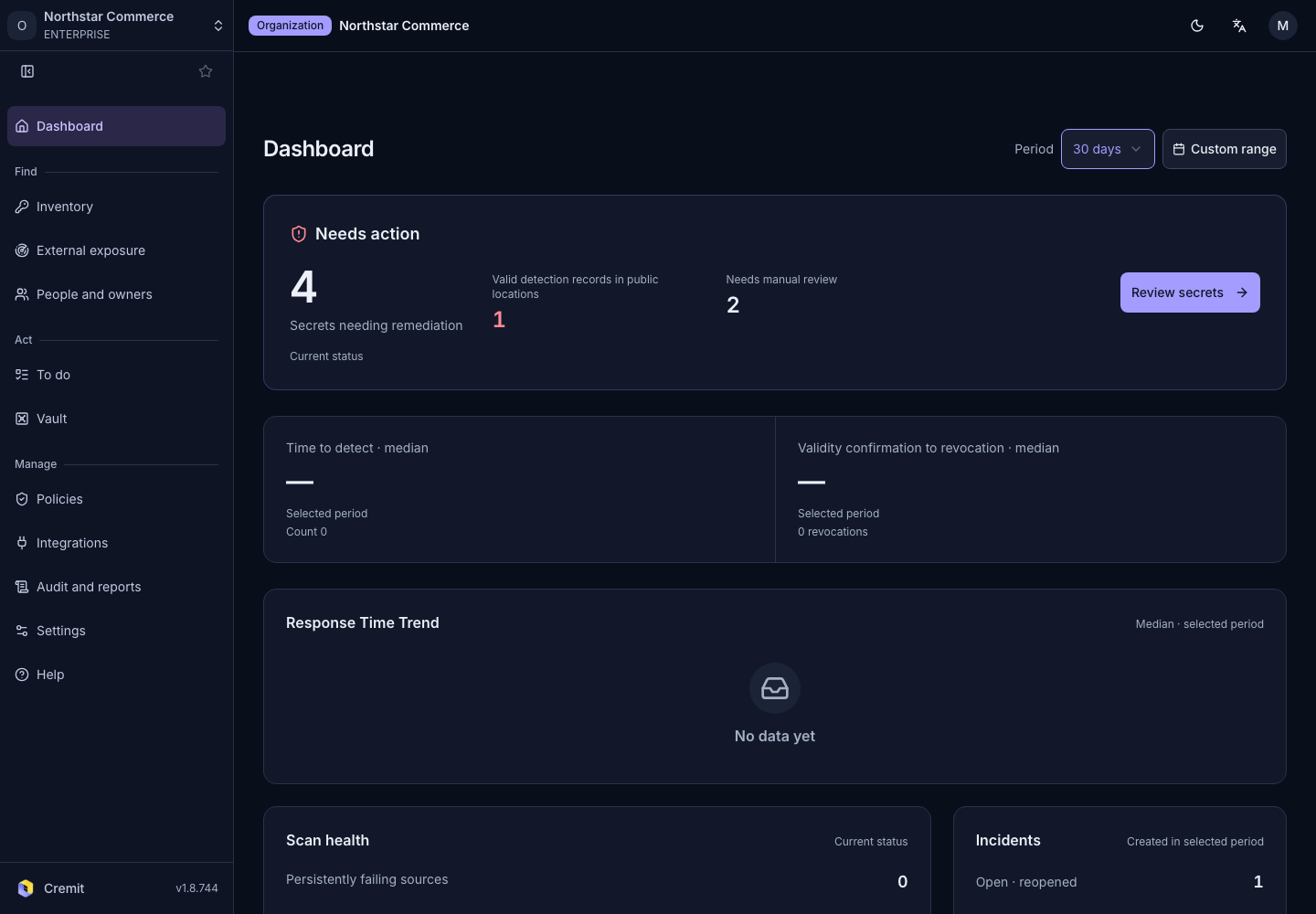
Period
Use Period at the top right to pick 7, 30 or 90 days, or set a start and end date with Custom range. The default is 30 days.
Each item states the range it counts:
- Selected period, Created in selected period: counts only what happened in the chosen period.
- Current status: shows the state right now, whatever the period.
- All time: counts everything from the start.
Summary at the top
An organization with no connected sources and no secrets found yet sees Start with your first scan source with a Connect a scan source button. See Connect your first scan source.
Otherwise, three numbers show the current state.
| Item | Meaning |
|---|---|
| Secrets needing remediation | Secrets that are Valid right now and whose remediation is not finished. Select the number to open the Needs action list. |
| Valid detection records in public locations | Secrets that are valid right now and were found somewhere anyone can see, such as a public repository or the internet. Shown in red when there is at least one. |
| Needs manual review | Secrets that automatic verification could not decide, so a person needs to check them. |
When nothing needs remediation, the heading changes.
- Only secrets needing manual review are left: Review unconfirmed secrets
- Neither is left: No secrets awaiting remediation
The button on the right opens the inventory list that fits the current state.
Response times
| Item | Meaning |
|---|---|
| Time to detect · median | The median time from when the commit or file containing a secret was created to when Cremit first found that secret. Items that existed before monitoring started are left out. |
| Validity confirmation to revocation · median | The median time from when a secret was confirmed valid to when its revocation was confirmed. Only secrets revoked in the chosen period are counted. |
Response Time Trend shows how both values changed over the period. Under each value is the change compared with the previous period of the same length. If either period has fewer than 10 cases, a note (Not enough data to compare) appears instead of the change.
Scan health and incidents
- Scan health: current counts of Persistently failing sources, Sources with failure reports and Targets at least half unreadable in the latest scan. Counts above zero are highlighted in color. View scan sources opens the scan source list.
- Incidents: incidents created in the chosen period, counted by status: Open · reopened, In progress, Acknowledged, Resolved and Closed.
Rankings and recent detections
- Valid detection records by rule, Valid detection records by source: up to five detection rules and sources with the most valid secrets. Select one to open its valid secrets in the inventory.
- Recent detections: up to six recently found secrets, grouped by where they were found. Select one to open the secret's details, or use View inventory for the full list.
Getting-started card
In a new organization, owners and admins see a card at the top of Dashboard that walks through the first steps. Select a remaining step to go to the screen where you complete it. The card disappears once every step is done.