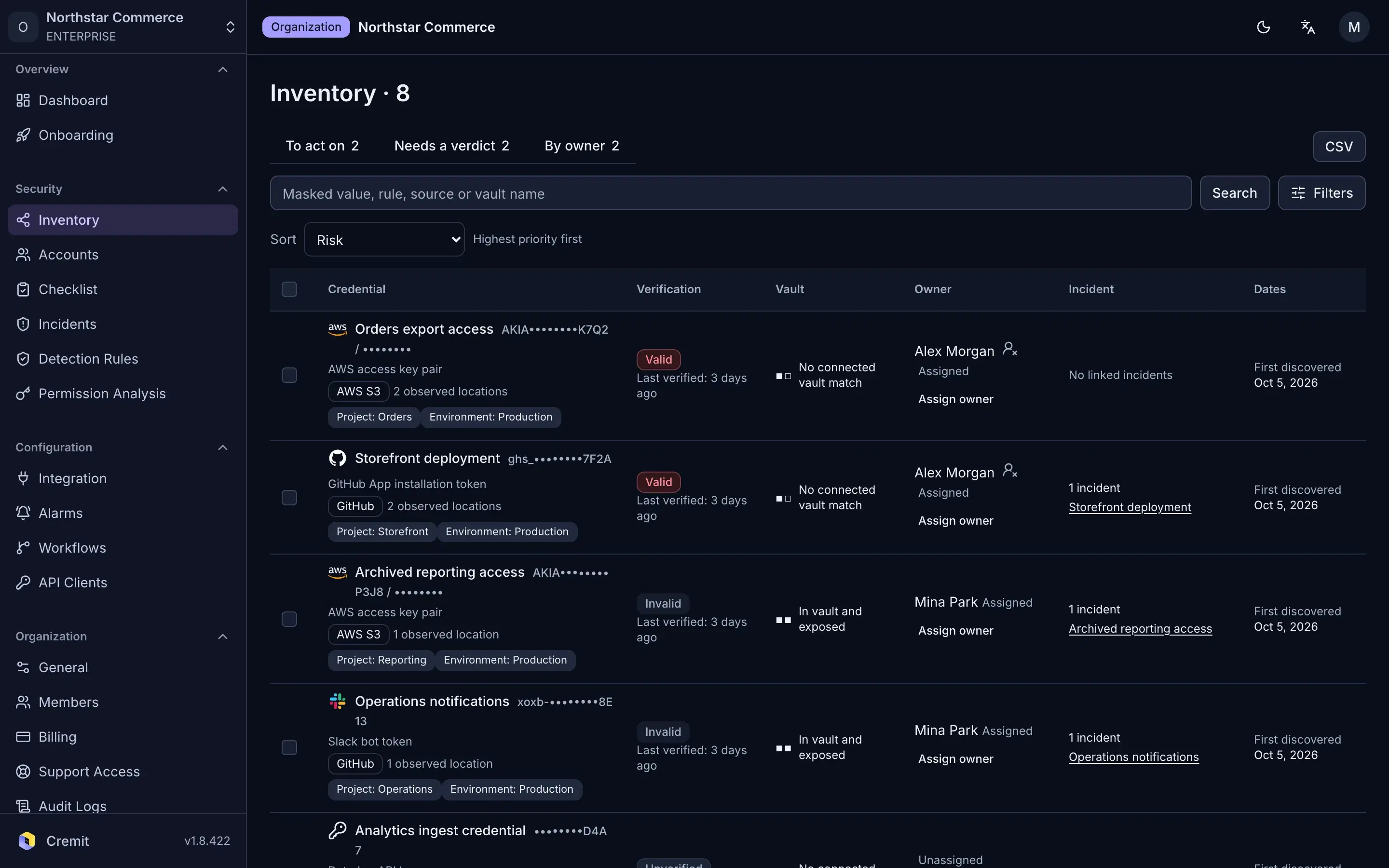
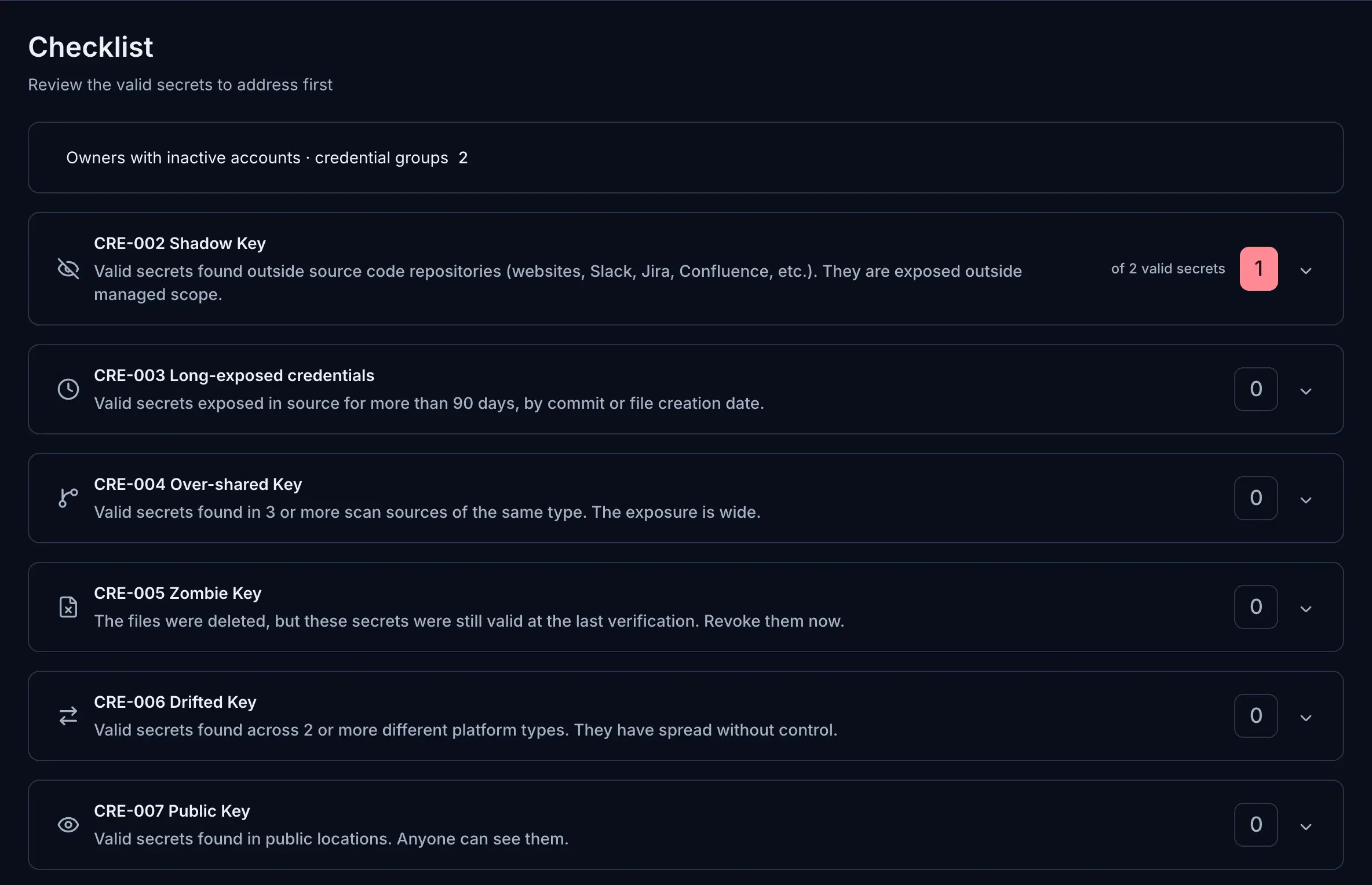
The real product, shown here with a fictional sample organization. Pick a step.
01Find
See what leaked, grouped by how it leaked.
The checklist sorts valid secrets by exposure pattern: outside source code, exposed for months, copied across tools, deleted but still valid, or public.
1,000+ detection rules
10 source types, from GitHub to Slack and Google Drive
Validity checks for supported credential types
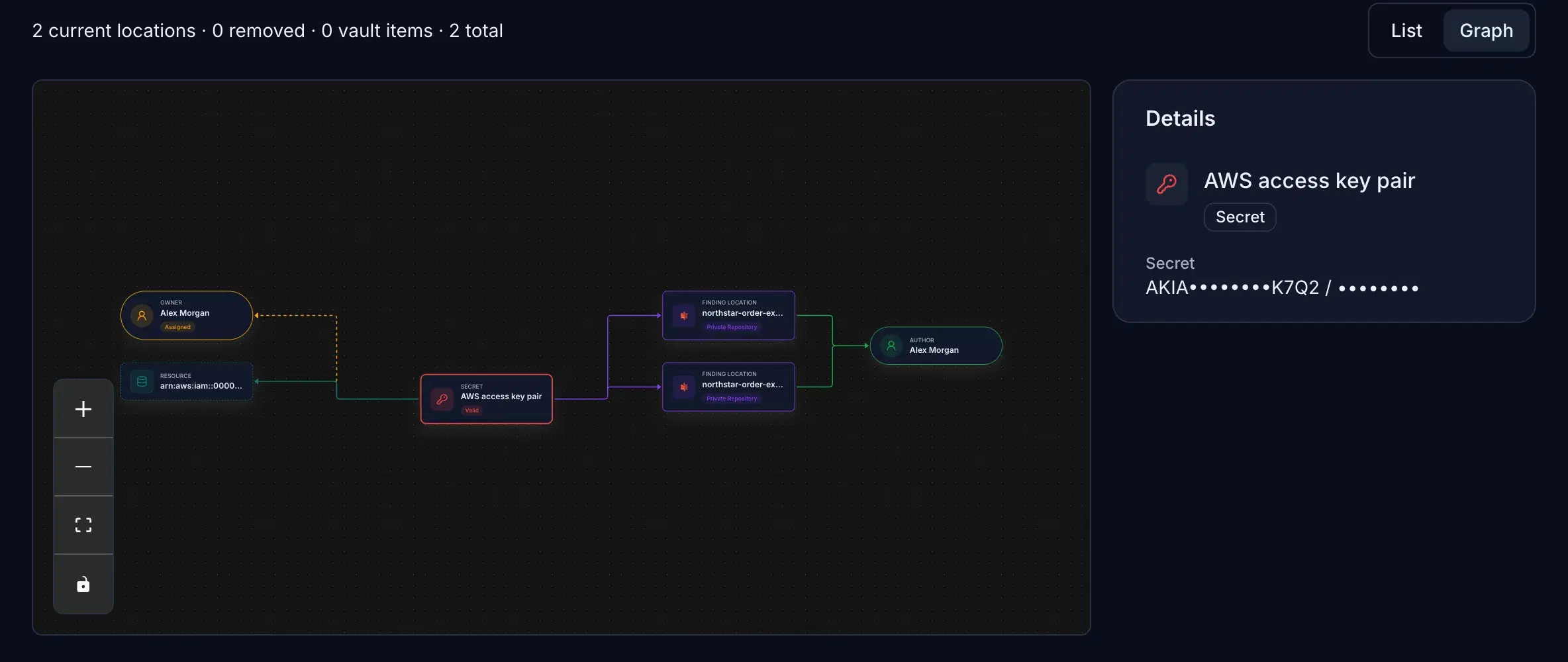
02Trace
Follow one key to every place it was copied.
Each credential keeps its locations, history and owner signals on one graph, so you know the full spread before anyone revokes it.
Source location and author candidate
Match against your secret manager
Owner assignment with history
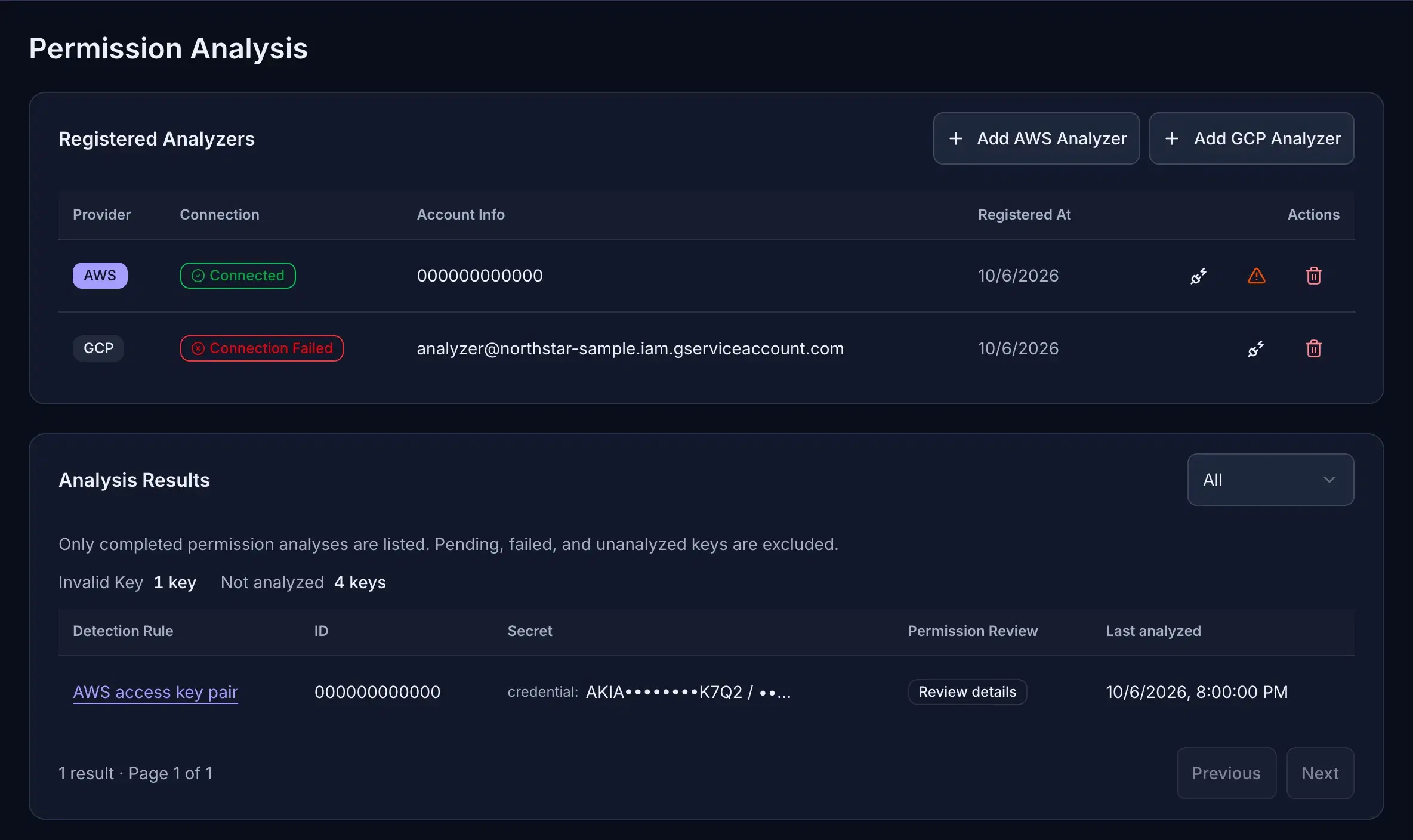
03Scope
See what each leaked key is allowed to do.
Register AWS and GCP analyzers once. Each supported key then gets a permission review next to its finding, so the most dangerous key is handled first.
AWS analysis through a least-privilege IAM role
GCP API key restrictions
Permission review shown next to the finding
04Respond
Route live keys to a person, not a queue.
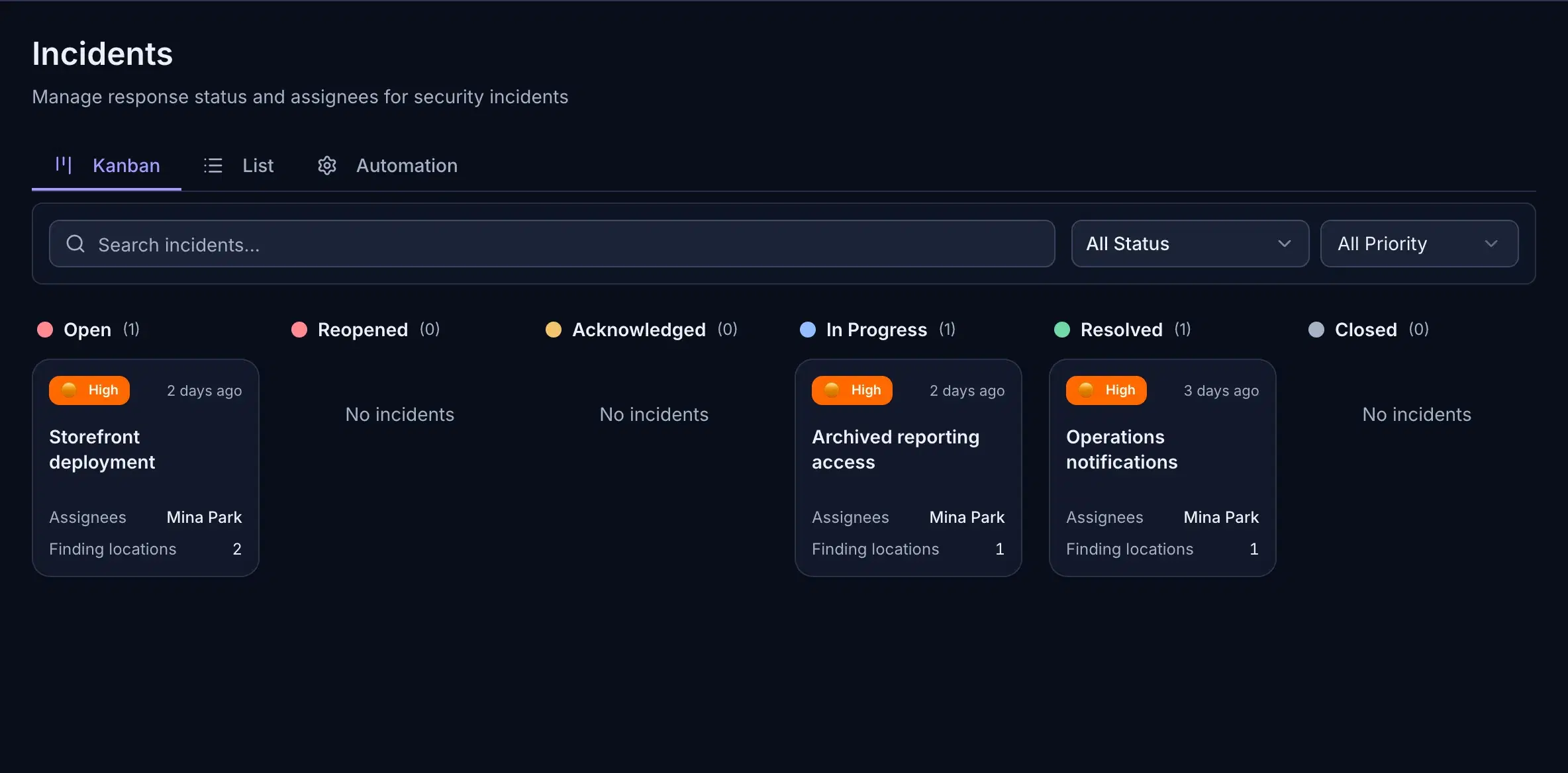
Open an incident from a finding, assign a responder and follow it to resolution. Alerts go to Slack, a webhook, Telegram or email.
Kanban and list views with assignees
Time to detect and resolve on the dashboard
Supported live keys rechecked about every 6 hours
05Vault
Check what your secret manager already holds.
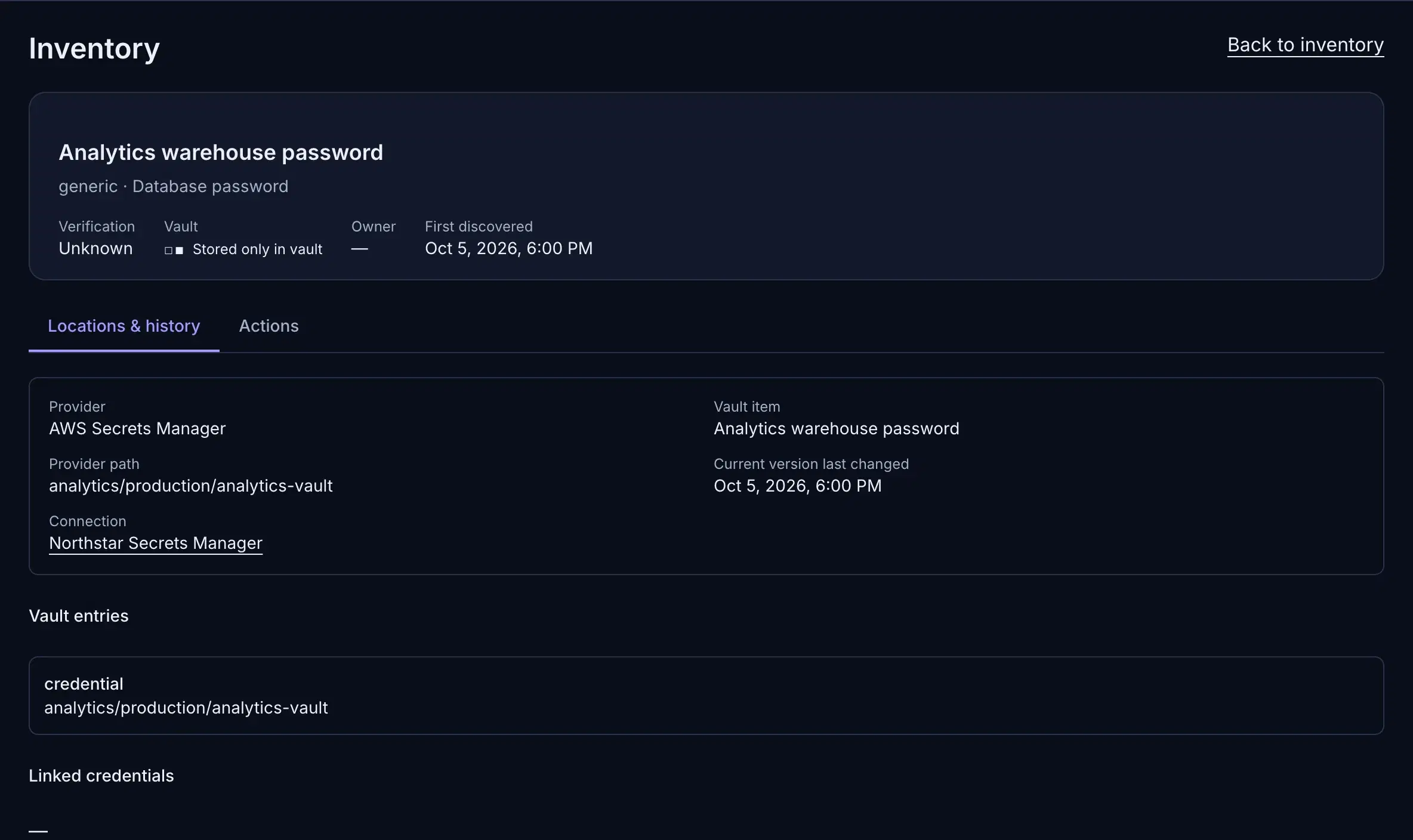
Connect your secret manager to see each stored secret with its provider path, current version and whether the same value also sits in code.
Stored only in the vault, or also exposed
Provider path and current version
One inventory for vaulted and exposed keys
06ShareComing soon
Hand keys to the people who need them.
Team sharing is coming to Cremit: API keys and tokens shared within the right scope, with access permissions and usage history, on the same inventory and owners shown here.
Scoped access per team
Access permissions and usage history
Built on the same inventory and owners
Coming soon
The product screen appears here when team sharing ships. Ask us about early access in a demo.
Every screen on this page is the shipped interface with sample data.
Cremit does not rotate or revoke credentials for you. It gives the right person the evidence to act at the issuer, then rechecks supported keys so you can confirm the old one stopped working.
Detect
1,000+ rules across 10 source types.
Verify
Supported types are checked with the issuer. The rest go to review.
Scope
AWS and GCP keys mapped to what they can reach.
Assign
Author candidates and directory accounts point to an owner.
Recheck
Supported live keys rechecked about every 6 hours.
Discovery, storage and sharing.
One management approach.
From a key found in code to a credential used by your team. Cremit’s platform design connects the credential lifecycle. Talk to us about the right setup for your team.
API keys and tokens for the people who need them, within the right scope. A shared workspace designed to connect team sharing, access permissions and usage history.
An access model that extends to developer tools and AI agents. The platform direction brings common credential controls to CLI, desktop and agent workflows.
“Traditional vendors communicate via email or phone, but with Cremit we can quickly reach out through Slack Connect. Having a feature request implemented in just 15 minutes was truly impressive.”
Rapportlabs
One security lead, three connected tools
“As a solo security lead at a growing commerce company, I couldn't keep up with credential management across all our platforms. Cremit gave me the visibility and automation I needed to do my job effectively — without asking for more headcount.”
8Percent
Five tools under one scan, in a day
“Before Cremit, we had no way of knowing where or how many credentials were exposed across our systems. Within a single day of deployment, we gained complete visibility into our entire environment, and every alert was a real threat — not a single false positive.”
ENlighten
28,800 power plants, and the keys to them
“As we prepared for ISMS certification, Cremit helped us identify Google Cloud service keys we didn't even know were exposed. Securing these credentials not only reduced our risk but gave us the documented evidence we needed for the audit.”
SBSi
The cloud behind a live broadcast
“As media infrastructure moves to the cloud, credential management becomes exponentially more complex. Cremit gave us the visibility we needed to secure our GitLab environment and protect the cloud infrastructure that serves millions of viewers every day.”
Ordercheck
Security a founder can run
“As a startup CEO wearing multiple hats, I didn't have time to manually check for exposed credentials. Cremit found AWS keys I didn't even know were at risk and let me secure them before anything happened.”
New research · September 2026 · Free PDF · English & Korean · No form
Blast Radius: a field playbook for leaked API keys
Record where the key was exposed and preserve available logs without delaying containment. The six-phase AWS, GCP and Azure guide also compares versions of AWS's compromised-key quarantine policy.
No. Cremit checks validity with the issuing service for supported credential types. Other findings need manual review. A successful check says the key authenticated at that time; it does not prove someone misused it.
Where does Cremit look?
It scans sources you connect, including GitHub, GitLab, Bitbucket, GHCR images, AWS S3, Google Drive, Jira, Confluence, Notion and Slack. External scanning can check bounded public content when enabled for your organization. It cannot inspect a local file or an unconnected service.
Can I see what a live key can access?
Cremit can show access context for supported AWS access keys and GCP API keys. That context depends on the available analysis; a validity result alone does not show every permission or prove the key was used. Check issuer records and activity logs before judging impact.
Who rotates or revokes a leaked key?
The service owner does that at the issuer. Cremit records where a key was found, its available verification result and the response status. An assigned owner, a suggested candidate and a source-file author are different signals; the team confirms who should act. Cremit does not rotate or revoke keys automatically.
Does Cremit store my source code?
Cremit reads source content during a scan but does not retain whole source files. It stores finding metadata and the credential value encrypted with AWS KMS for supported re-verification. A customer-managed KMS key can be configured.
Can I start without a sales call?
Yes. The free plan at argus.cremit.io does not require a credit card. Connect a supported source and review its findings before choosing a paid plan.
Does a detection rule match prove the key works?
No. A match still needs review; it does not prove the key works. Cremit checks validity with the issuer for supported credential types, and other findings stay marked for manual review.
How often are active keys rechecked?
Supported keys last confirmed active are rechecked about every 6 hours. Types without a verifier are not rechecked automatically.
Are the product screens on this page real?
The interface is the actual Cremit product. The records belong to a fictional sample organization, so counts, statuses and owner assignments are illustrative values, not customer results.
What does external scanning check?
It proposes public assets related to a registered domain or GitHub organization, with the evidence for each. Content secret checks are separately enabled and bounded; review what was actually scanned for each target.
What is non-human identity (NHI) security?
A non-human identity is a service account, workload principal or other software actor authenticated with a key, token, certificate or delegated grant. Securing it means knowing who controls it, what it can access and how to retire that access. A credential found outside its approved store is one signal to investigate.
Cremit Platform scans connected repositories, cloud storage and collaboration tools for exposed credentials. It checks current validity for supported types and adds available access context for supported AWS access keys and GCP API keys. A finding keeps its source location and ownership signals so a person can confirm who should respond at the issuer.